Staff
What is Staff?
A staff member represents an operational user assigned to a specific warehouse within the logistics system. Each staff profile links a user account to a warehouse and defines their role, responsibilities, and access permissions. Staff profiles enable the system to control warehouse-level operations, enforce role-based permissions, and maintain accountability across picking, receiving, supervision, and management activities.
Proper staff management ensures that warehouse operations run efficiently with clear task ownership, secure access controls, and organized workforce coordination across multiple locations.
Staff List
The Staff List provides a comprehensive view of all warehouse-level staff members registered in your system.
Use the list to monitor role assignments, verify access configurations, and manage warehouse personnel. The interface includes:
- Search functionality: Quickly locate staff members by user name, warehouse, or role.
- Filtering options: Filter by warehouse location, role type (Manager, Supervisor, Picker, Receiver), or status (Active/Inactive).
- Sorting capabilities: Sort by warehouse, staff user, role, or current status.
- Quick actions: Access staff details, edit assignments, or change status directly from the list.
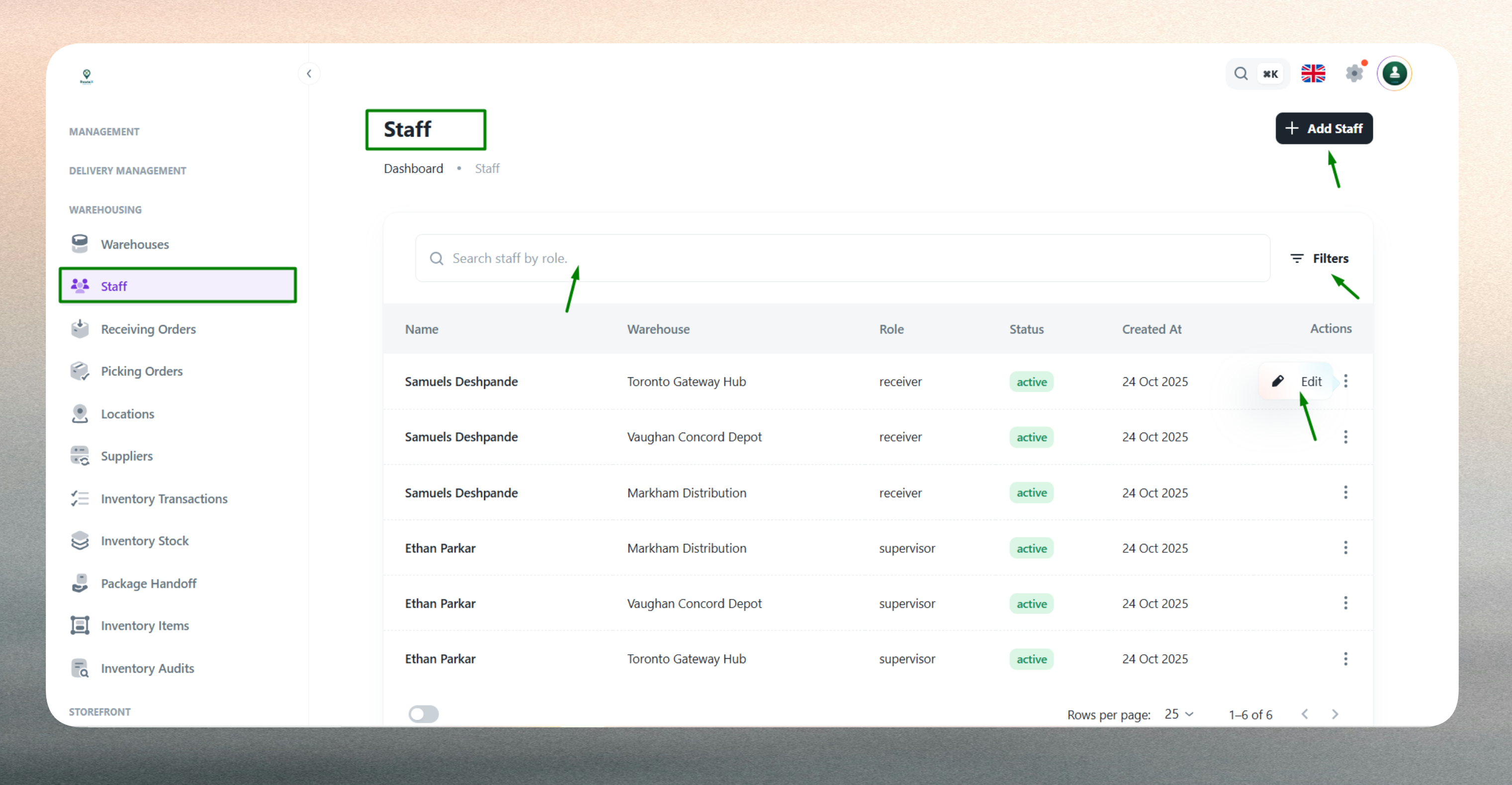
The list displays key information such as assigned warehouse, linked staff user, operational role, and current status for easy reference and workforce management.
Create a New Staff Member
Creating a staff profile requires linking an existing user account to a warehouse and defining their operational role and access permissions.
Staff assignment connects registered users with warehouse-level responsibilities, granting them the appropriate permissions to perform tasks such as inventory management, order picking, receiving operations, or supervision. Once a user is assigned as staff, they gain access to warehouse-specific features and applications based on their designated role.
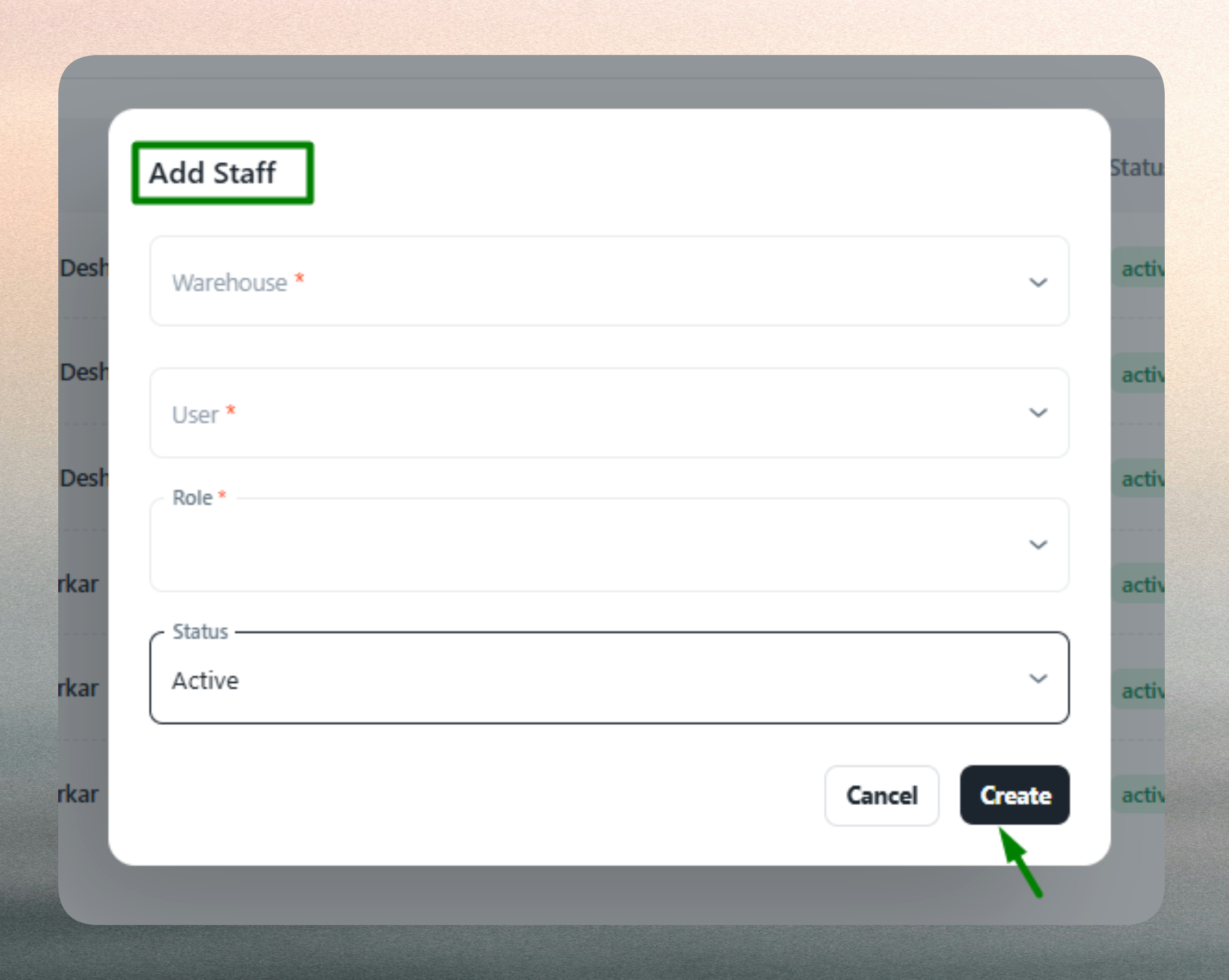
Warehouse Assignment
Specify the warehouse where the staff member will operate. The warehouse assignment determines the operational scope and ensures that each staff member only interacts with relevant inventory, orders, and activities within their designated location. This prevents cross-warehouse data access and maintains clear operational boundaries.
User Selection
Link the staff profile to an existing registered user account. The selected user must already exist in the system before being assigned to warehouse operations. This linkage connects the user's identity, authentication, and base permissions with warehouse-specific responsibilities.
Role Definition
Define the staff member's operational role to establish their responsibilities and task ownership within the warehouse:
- Manager: Oversees all warehouse operations, monitors performance, and manages staff activities.
- Supervisor: Coordinates daily activities, ensures task completion, and supports operational workflow.
- Picker: Handles order fulfillment, item selection, and packing for outbound deliveries.
- Receiver: Manages inbound goods, inspection, stock placement, and return processing.
Roles determine which warehouse tasks and features the staff member can access, ensuring appropriate permissions and preventing unauthorized operations.
Status & Access
Set the staff member's operational status (Active or Inactive) to control their participation in warehouse activities. Active staff are available for task assignments and can access warehouse applications, while Inactive status excludes them from operations during leave, training, or termination without removing their historical records.
Validation
The system validates all required fields and enforces business rules. Warehouse, staff user, and role selections are mandatory. The system prevents duplicate assignments—the same user cannot be assigned to the same warehouse more than once. Any validation errors are highlighted for correction before submission.
Edit an Existing Staff Member
Staff profiles can be updated at any time to reflect changes in assignments, roles, or availability.
Common updates include:
- Role changes: Promote or reassign staff members to different operational roles based on training or organizational needs.
- Status updates: Toggle between Active and Inactive status for leave management, role transitions, or workforce changes.
- Warehouse reassignment: Move staff members to different warehouse locations as operational requirements evolve.
- Access control: Adjust permissions and access configurations to align with current responsibilities.
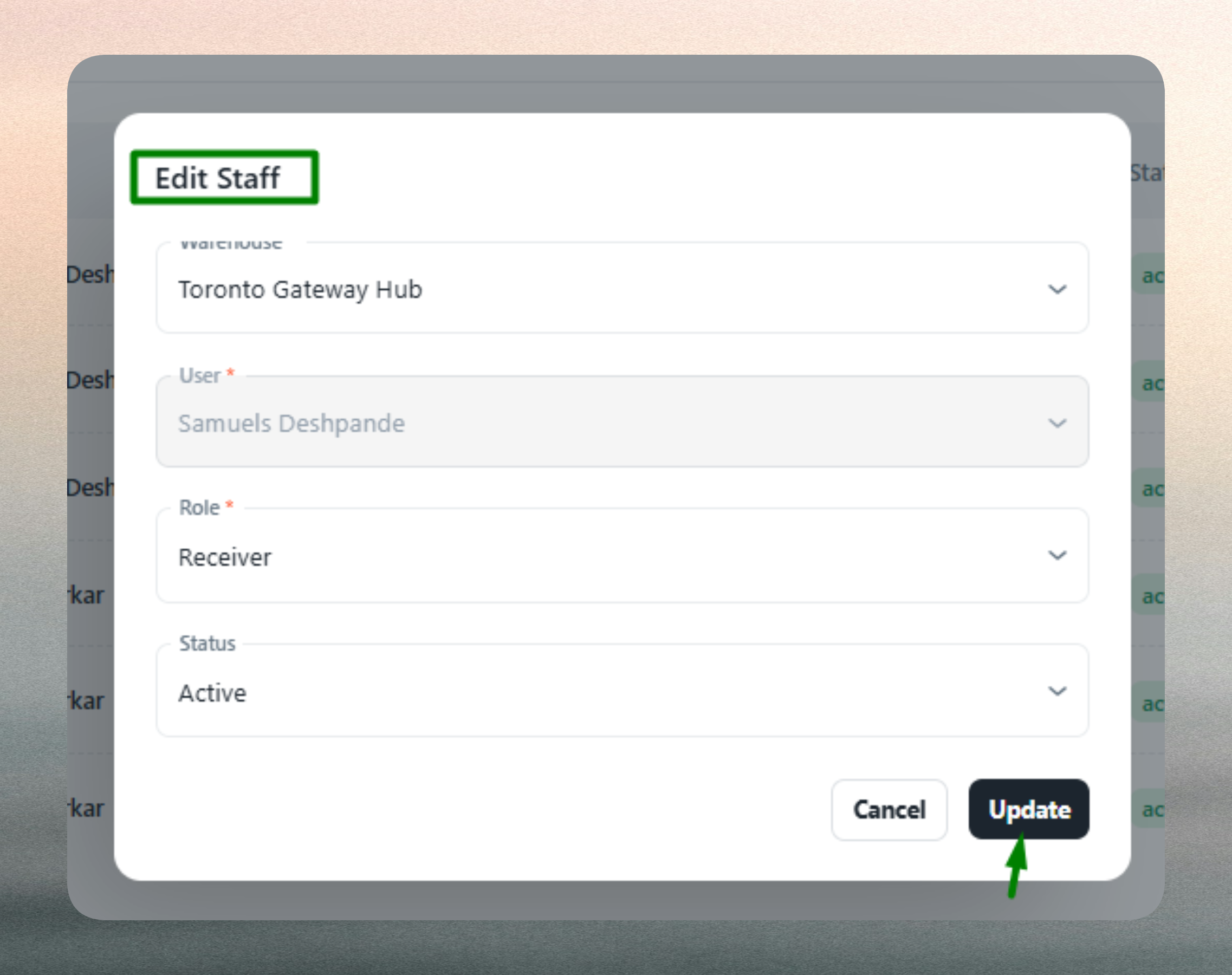
Editing staff profiles ensures accurate warehouse operations, maintains proper access controls, and supports dynamic workforce management. The system retains historical assignment data for reporting, auditing, and compliance purposes.
Keep staff assignments current to maintain operational accuracy and prevent unauthorized access to warehouse data and applications.
Assign roles carefully based on training and qualifications. Use consistent naming and assignment practices for easier workforce management across multiple warehouses.
Mark staff as Inactive instead of deleting their profiles if they are temporarily unavailable. This preserves historical data and allows for easy reactivation when needed.