View order details
The order detail page is where an admin understands the full story of one customer order. Use it before approving an order, editing items, answering support questions, cancelling an order, or creating delivery work.
The list page is good for scanning many orders. The detail page is for decisions.
Open an order
- Go to Storefront -> Orders.
- Use search or filters to find the order.
- Open the order action from the row.
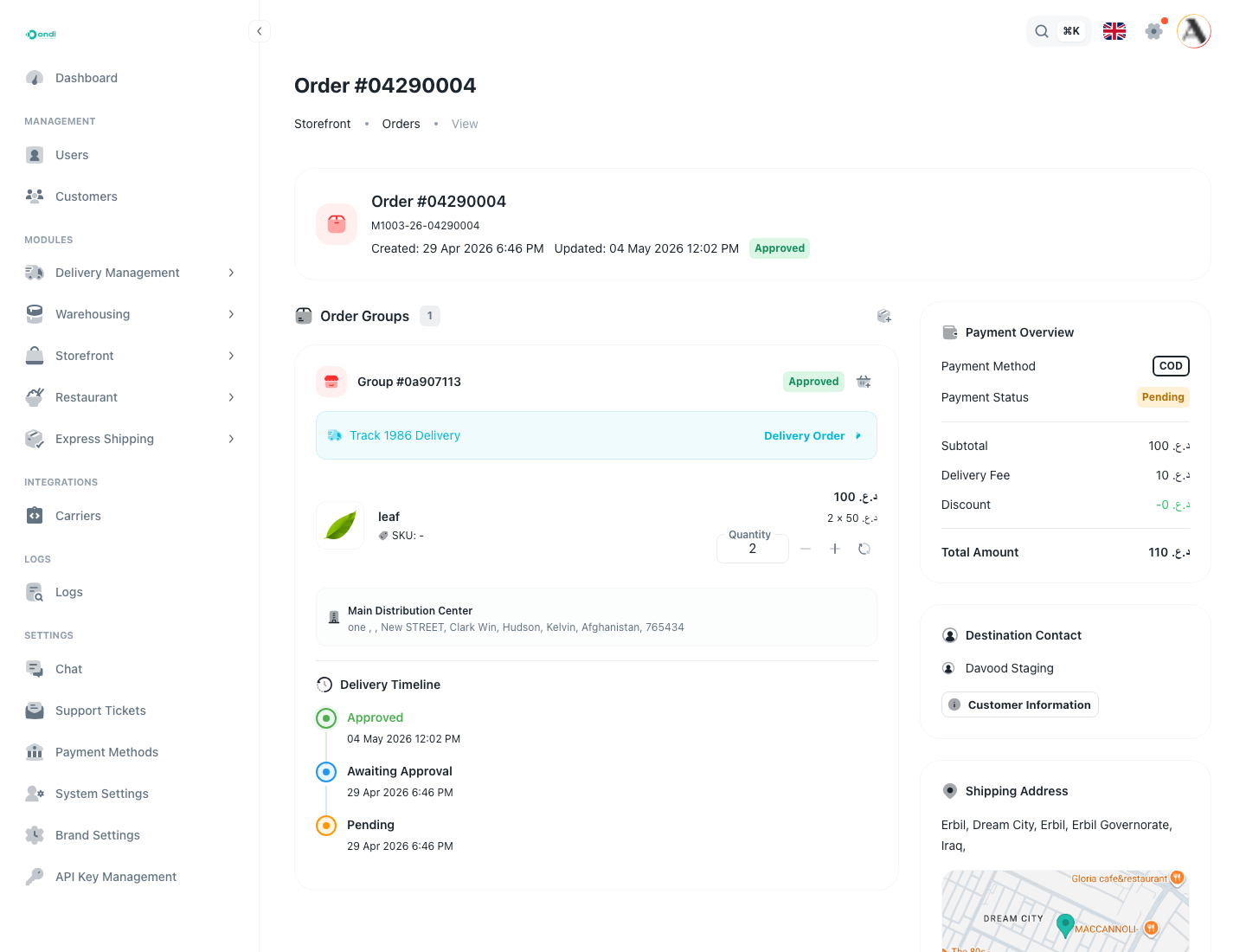
- Review the order header first: status, order number, final amount, and updated date.
- Review the groups and items.
- Review the side panels for payment, destination contact, address, and timeline.
The detail page keeps the operational decision points together: order groups and items in the main area, and payment, contact, address, delivery, and timeline context in the side panels.
What to review first
Start with payment and status. If the order is unpaid, failed, cancelled, or refunded, do not approve or fulfill it until the payment state makes sense for the tenant's process.
Then review the customer and address. Make sure the address looks complete enough for delivery and that the contact information can be used by support or delivery teams if needed.
Finally review the items and order groups. Check quantities, product names, variants, warehouse grouping, and whether any group needs approval or item edits.
Order groups
Order groups exist because one customer order may need separate warehouse handling. For example, one order may include items from different warehouses or items that need separate delivery handling.
Each group has its own status, items, totals, and timeline. Admin actions can apply to the whole order or to a specific group depending on the current status.
Status timeline
The timeline helps admins understand what changed and when. Use it when investigating support questions, delivery issues, or unexpected status changes.
If the timeline does not match what the customer is reporting, review delivery status and order group status before changing the order manually.
Where customers see this
Customers do not see the admin order detail page. They see a customer-facing order view in the customer portal. The information admins maintain here affects what the customer understands about order approval, fulfillment, delivery, cancellation, and support follow-up.